Getting Started with AI
for Your Business.
A practical, no-jargon guide for business owners, founders, and senior leaders who know AI matters — but aren't sure where to begin. Built for Australian and NZ SMBs ready to move from curiosity to action.
The Landscape
Why 2026 Is the Year
to Start.
AI is no longer experimental. The tools are affordable, the use cases are proven, and the businesses that act now are opening up a lead that will be hard to close.
Twelve months ago, adopting AI meant navigating hype, wrestling with clunky tools, and hoping for results. That era is over. In 2026, AI assistants like Claude, ChatGPT, and Gemini can write, research, analyse, and automate at a quality level that rivals — and often exceeds — what a junior hire can produce.
AI agents can now perform multi-step tasks autonomously: researching prospects, drafting proposals, managing inboxes, and routing customer enquiries — all without constant human oversight. No-code platforms like Make, Zapier, and n8n let you connect these AI capabilities directly into your existing tools in hours, not months.
The cost barrier has collapsed. Most AI tools cost less per month than a single team lunch. And the gap between businesses that have adopted AI and those that haven't is no longer theoretical — it's showing up in response times, content output, lead conversion, and profitability.
This isn't about chasing the next shiny thing. It's about recognising that the operating model for small and medium businesses has fundamentally changed — and the window to adopt early, before your market catches up, is now.
Businesses that have already piloted AI are doubling down. Those that haven't are watching their competitors pull ahead in speed, quality, and customer experience.
WHAT'S CHANGED IN THE LAST 12 MONTHS
- AI agents can now complete multi-step workflows autonomously
- Voice AI handles real-time customer calls with natural conversation
- No-code AI integration platforms have matured significantly
- Costs have dropped 60-80% while quality has improved dramatically
- Industry-specific AI tools are now available for most verticals
Our Framework
The Two Gaps Every
Business Must Close.
Before you pick a tool or sign up for anything, you need to understand where you're actually losing ground. We see every business facing two fundamental gaps that AI can address.
The Visibility Gap
You can't improve what you can't see. Most SMBs are flying blind on how their customers find them, what competitors are doing, and where their marketing and operations are underperforming.
AI closes this gap by surfacing insights that were previously only accessible to businesses with dedicated analytics teams: customer behaviour patterns, competitive positioning, content performance, and operational bottlenecks.
Signs you have a visibility gap
- You don't know which marketing channels drive your best leads
- You can't articulate why customers choose you over competitors
- Your team makes decisions based on gut feel, not data
- You learn about market shifts from customers, not before they happen
The Capability Gap
Your team is talented, but there aren't enough hours in the day. The capability gap is the difference between what your business needs to do and what your current team and tools can actually deliver.
AI closes this gap by giving your existing team superpowers — the ability to produce more, respond faster, and handle complexity that previously required hiring or outsourcing.
Signs you have a capability gap
- Your team is stretched thin and dropping balls on follow-up
- You know you should be doing more content, outreach, or reporting — but there's no bandwidth
- Customer response times are slower than you'd like
- You're relying on manual processes that don't scale
"Every business we work with has both gaps — they just feel them in different places. The visibility gap tells you where to look. The capability gap tells you what to build. AI addresses both."
You Better Ask — AI Consulting, AustraliaThe Process
Five Steps to AI
Adoption.
You don't need a 12-month roadmap or an enterprise budget. Here's the practical path we recommend for every SMB — from first audit to scaled AI operations.
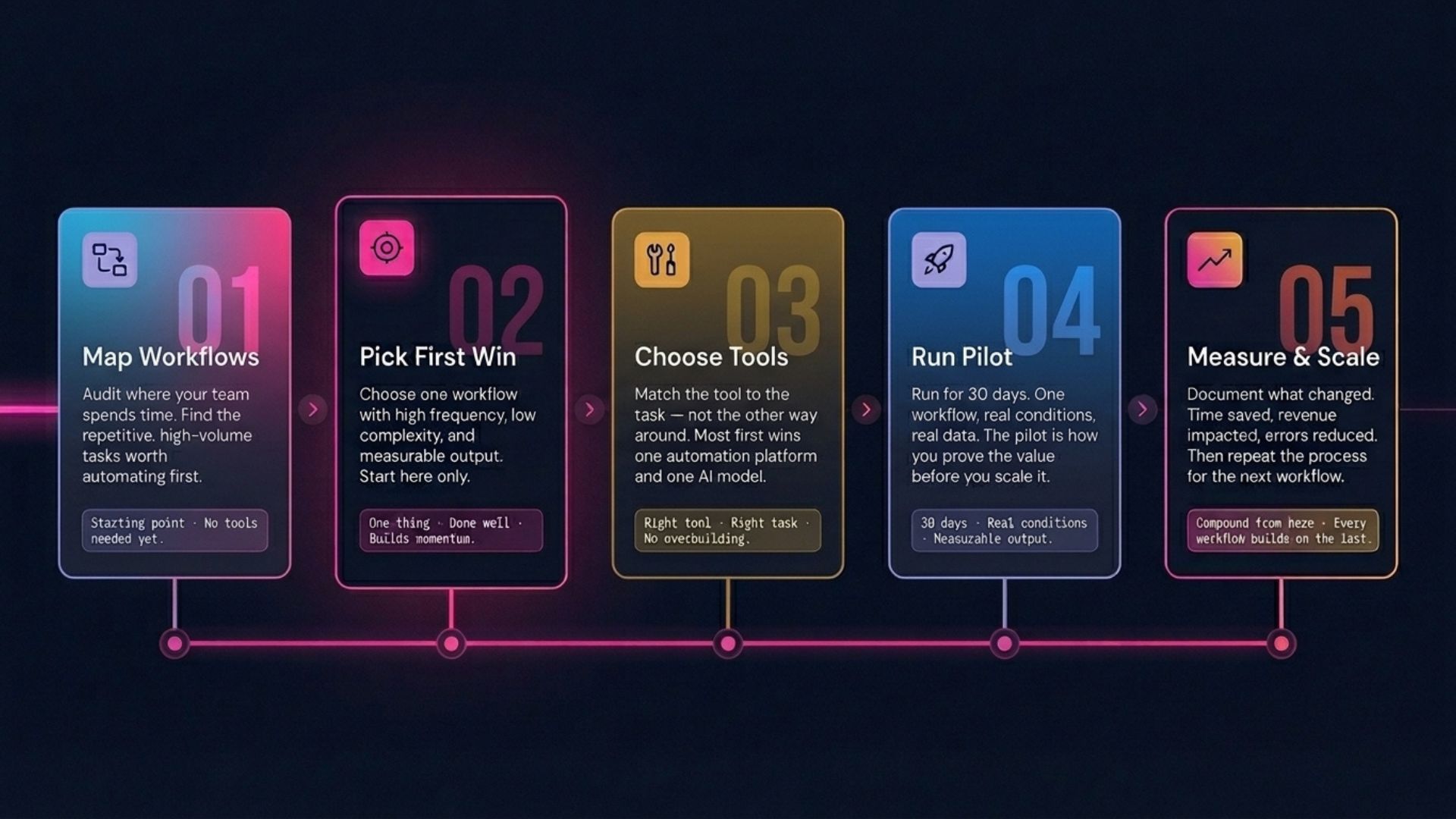
Step 01
Map Your
Workflows.
Before you touch any AI tool, understand where your time and money actually go. The best AI implementations start with clarity, not technology.
Spend one week mapping the repetitive tasks across your business. Talk to your team. Watch where they spend time on work that feels manual, repetitive, or low-value. These are your AI opportunities.
Focus on three categories:
1. Time-intensive tasks
What eats up disproportionate hours? Common culprits: email drafting, meeting notes, report generation, social media content, data entry, invoice processing, and lead research.
2. Quality bottlenecks
Where does work quality suffer because the team is stretched? Think: inconsistent customer follow-up, outdated marketing content, slow proposal turnarounds, or patchy reporting.
3. Revenue leaks
Where are you losing potential revenue to slow processes? Leads going cold because follow-up takes too long. Quotes delayed because they require manual research. Opportunities missed because no one has time to analyse the data.
"Don't start with 'what AI can do.' Start with 'what's costing us the most time, money, or missed opportunity.' Then ask whether AI can help."
QUICK AUDIT EXERCISE
Ask each team member to list their top 5 most time-consuming weekly tasks. Categorise them as: could be automated, could be augmented with AI, or requires human judgment. You'll be surprised how much falls into the first two categories.
FREE TOOL
Not sure where to start? Our AI Audit tool analyses your business and identifies the highest-impact AI opportunities — free, in under 3 minutes.
Get Your Free AI AuditStep 02
Pick Your
First Win.
Don't try to transform everything at once. Choose one workflow that's high-impact, low-risk, and clearly measurable. Early wins build momentum and buy-in across your team.
The best first use case has three qualities: it's repetitive (happens daily or weekly), it's time-consuming (takes real hours), and it doesn't require complex judgment (the rules are relatively clear).
High-impact starting points for most SMBs
- Content creation: Use AI to draft blog posts, social media captions, email newsletters, and marketing copy. Edit for brand voice rather than writing from scratch.
- Customer response automation: Set up AI-powered email responses or chatbots for common enquiries, after-hours coverage, or FAQ handling.
- Meeting notes and summaries: Use AI transcription tools to automatically capture, summarise, and distribute meeting outcomes and action items.
- Lead research and enrichment: Let AI research prospects before calls, pulling company info, recent news, and relevant talking points into your CRM.
- Report generation: Automate weekly or monthly reporting from your existing data — sales dashboards, marketing metrics, or financial summaries.
- Proposal and quote drafting: Use AI to generate first drafts of proposals based on templates and client-specific details, cutting turnaround from days to hours.
How to prioritise
Score each potential use case on two axes: time saved per week (hours) and ease of implementation (1-5). Start with the use case that scores highest on both. You can always expand later.
Drafting customer emails
Repetitive, happens daily, doesn't require complex judgment. AI drafts; your team reviews and sends. Time saved: 5-10 hours/week for a team of 4.
Weekly marketing reports
Clear inputs (analytics data), clear output (summary report), easy to validate. Frees up 2-4 hours/week and improves consistency.
Full sales process automation
Too complex, too many variables, and high stakes if it goes wrong. Save this for after you've built confidence with simpler wins.
Step 03
Choose the
Right Tools.
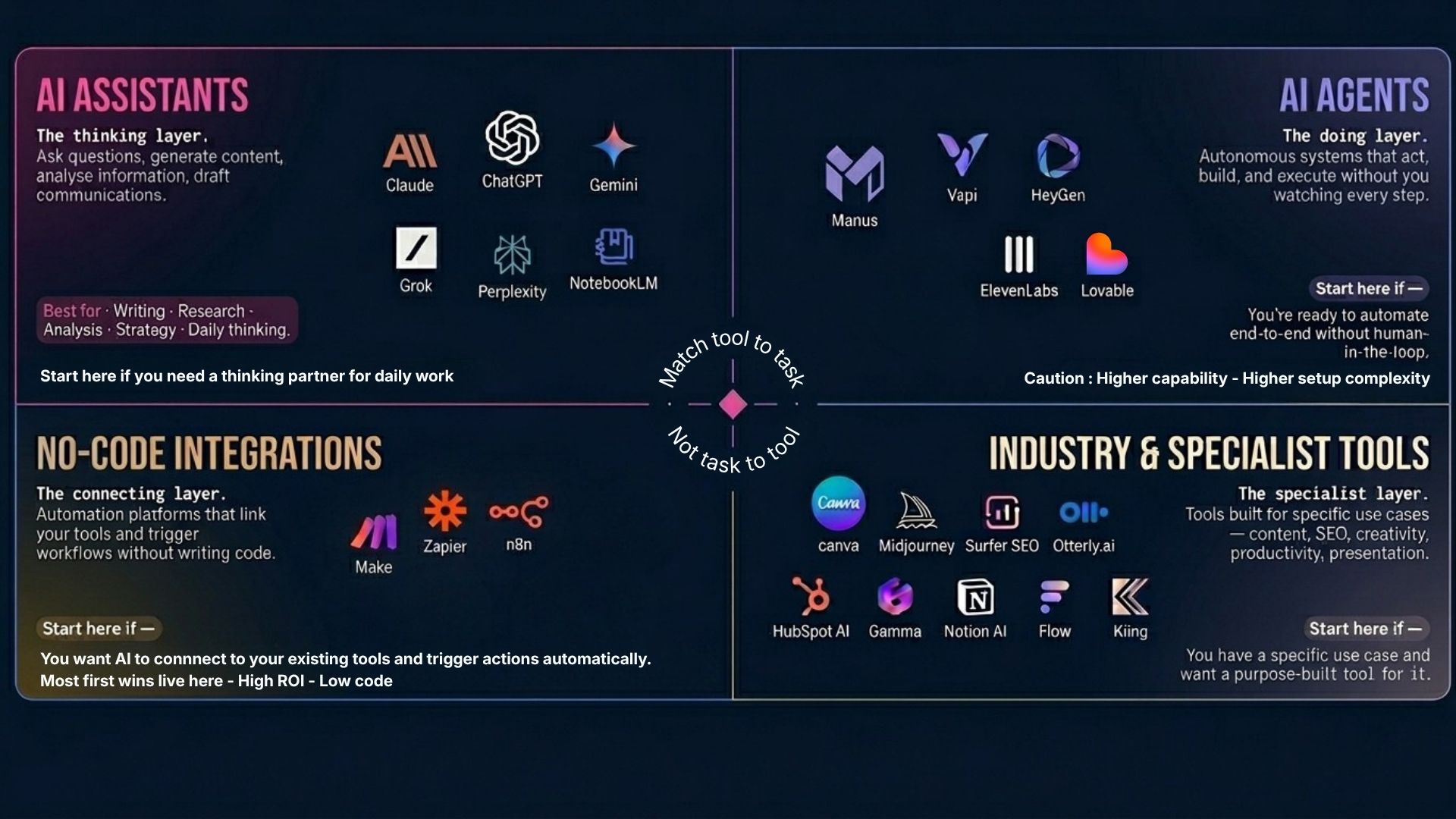
The AI tool landscape is overwhelming. Here's a practical framework for choosing tools that match your use case, technical ability, and budget.
AI assistants — your starting point
For most SMBs, an AI assistant is the fastest path to value. Tools like Claude (Anthropic), ChatGPT (OpenAI), and Gemini (Google) can handle writing, research, analysis, summarisation, and brainstorming out of the box. In 2026, these tools also support "projects" — persistent workspaces where the AI remembers your business context, brand guidelines, and preferences across conversations.
Cost: $20-30/month per user. Time to value: immediate.
AI agents — for autonomous workflows
AI agents go beyond chat. They can execute multi-step tasks independently: research a list of prospects, draft personalised outreach for each, log it in your CRM, and flag the top leads for human review. In 2026, agent platforms from Anthropic, OpenAI, and Google — as well as open-source frameworks — make this accessible without a developer on staff.
Best for: defined, repeatable processes with clear inputs and outputs.
No-code integration platforms
Tools like Make, Zapier, and n8n connect your AI tools to your existing business software — CRM, email, calendars, accounting, project management. They let you build automated workflows visually, without writing code.
Example: A new enquiry hits your website form. Make triggers an AI to draft a personalised response, sends it via your email tool, creates a CRM record, and notifies your sales team on Slack — all in under 60 seconds, 24/7.
Industry-specific AI tools
Beyond general-purpose AI, there are now tools purpose-built for specific industries — from AI property descriptions for real estate, to AI clinical note-taking for health, to AI financial report analysis for accounting firms. We cover these in detail on our industry pages.
DON'T OVER-INVEST UPFRONT
Start with one or two tools, not ten. Most businesses get 80% of their initial AI value from a single AI assistant ($25/mo) and one integration platform ($20-50/mo). Expand only when you've proven value and your team has built confidence.
THE TOOL ISN'T THE STRATEGY
Choosing the right tool matters, but it's the least important part of AI adoption. The workflow design, the prompts, and the team's willingness to change how they work — that's where results come from. A $25/month tool with a great workflow beats a $500/month tool with no plan.
Step 04
Run a Focused
Pilot.
Don't roll out AI company-wide from day one. Pick one team, one workflow, and one measurable outcome. Give it 2-4 weeks.
A pilot isn't a trial — it's a structured experiment. Define what success looks like before you start. Measure it. Then decide whether to expand, adjust, or try a different approach.
Your pilot checklist
- Define the workflow: Which specific process are you augmenting or automating?
- Set a baseline: How long does this process take today? What does the output look like?
- Choose your metric: Time saved? Quality improvement? Response speed? Lead conversion rate?
- Assign an owner: One person should own the pilot and report back on results.
- Set a timeframe: Two to four weeks is usually enough to see meaningful signal.
- Document what you learn: What worked? What didn't? What would you change?
Common pilot mistakes
Too broad: Trying to test AI across multiple workflows at once. Keep it focused.
No baseline: If you don't know how long the process took before, you can't prove AI made it better.
No owner: AI pilots that don't have a single accountable person tend to fizzle. Assign someone who cares about the outcome.
Most businesses can run a meaningful pilot in under a month. Start small, learn fast, and use the results to make a case for wider adoption across your team.
Step 05
Measure, Learn,
Scale.
Your pilot produced results. Now it's time to build on what worked, expand to adjacent workflows, and develop your team's AI capabilities.
Scaling AI isn't about buying more tools. It's about building the muscle. The teams that get the most from AI are the ones that develop internal expertise: better prompting, better workflow design, and a culture of continuous experimentation.
How to scale from pilot to practice
- Share your results: Show the team what the pilot achieved — time saved, quality improved, costs reduced. Real numbers build buy-in.
- Pick the next workflow: Use your original audit to identify the second-highest-impact opportunity. Apply the same pilot framework.
- Build team capability: Invest in prompt engineering training, workflow design skills, and AI literacy across your team. This is the highest-ROI investment you can make.
- Create shared resources: Build a library of prompts, templates, and workflows that your team can reuse and improve over time.
- Review monthly: Set a regular cadence to review what's working, what's not, and where the next opportunity lies.
The compounding effect
AI adoption compounds. Your first workflow saves hours. Your second saves more, because your team already knows how to work with AI. By the fifth or sixth workflow, you're operating at a fundamentally different level — and your competitors are still debating whether to start.
First workflow live
One process automated or augmented. 5-10 hours/week saved. Team starts building AI confidence.
Expanding to 2-3 workflows
Marketing, customer comms, and reporting all benefiting. Team proactively finding new use cases.
AI-integrated operations
AI is embedded across marketing, sales, and ops. Connected workflows with agents handling routine tasks autonomously. Measurable impact on revenue and efficiency.
AI by Industry
Specific Use Cases
for Your Industry.
The steps above apply to every business. But the specific AI use cases that deliver the most value depend on your industry. We've created detailed guides for the sectors we work with most.
Property & Real Estate
AI-powered property descriptions, automated buyer matching, market analysis, and vendor communication.
Finance & Professional Services
AI-assisted compliance, report generation, client communication, and financial analysis workflows.
Health & Wellness
AI clinical notes, patient communication, appointment management, and practice marketing automation.
Retail & Commerce
AI product descriptions, inventory insights, customer service automation, and personalised marketing at scale.
Frequently Asked Questions
AI Adoption
FAQ.
Straight answers to the questions we hear most from business owners and leadership teams exploring AI for the first time.
How much does it cost for a small business to start using AI?
Many AI tools offer free tiers or cost under $50/month per user. Most SMBs can run a meaningful AI pilot for under $500/month in tooling costs. The real investment is time — typically 2-4 weeks to set up and test your first workflow. Compare that to the cost of hiring: AI gives you capacity that would otherwise require a full-time hire, at a fraction of the cost.
Do I need technical skills to implement AI in my business?
No. In 2026, most business AI tools are no-code or low-code. Platforms like Claude, ChatGPT, Gemini, Make, and Zapier are designed for non-technical users. You need curiosity and a clear understanding of your workflows — not a computer science degree. For more complex integrations (custom agents, API connections), you may want a consultant or technical partner, but the starting point requires zero coding.
What is the best first AI use case for a small business?
Start with a repetitive, time-consuming task that doesn't require complex judgment — such as drafting email responses, summarising meeting notes, generating social media content, or automating lead follow-up sequences. The ideal first use case is something your team does daily that has clear inputs and outputs. See Step 2 above for detailed examples.
How long does it take to see results from AI adoption?
Most businesses see measurable time savings within 2-4 weeks of implementing their first AI workflow. Revenue impact typically follows within 2-3 months as improved speed and consistency compound across customer-facing processes. The businesses that see the fastest results are the ones that start focused (one workflow, one team) rather than trying to transform everything at once.
Will AI replace my team?
AI replaces tasks, not people. The businesses getting the best results use AI to free their team from repetitive work so they can focus on strategy, relationships, and creative problem-solving — the things humans do best. In practice, AI adoption typically leads to higher team satisfaction (less grunt work) and higher output (more time for high-value activities), not layoffs.
What are AI agents and should my business use them?
AI agents are autonomous AI systems that can perform multi-step tasks without constant human input — like researching prospects, drafting proposals, or managing customer enquiries end-to-end. In 2026, agent-based AI is accessible to SMBs through platforms like Anthropic (Claude), OpenAI, and Google. They're best suited for well-defined workflows where the AI can act independently within clear guardrails. If you're new to AI, start with an AI assistant first, then graduate to agents once you've identified workflows that benefit from autonomy.
Is my business data safe when using AI tools?
Reputable AI providers (Anthropic, OpenAI, Google) offer enterprise-grade data handling. On paid plans, your data is not used to train models. For sensitive industries (health, finance, legal), choose providers with SOC 2 compliance and data processing agreements. The key is to establish a clear AI usage policy for your team: what data can be shared with AI tools, what can't, and how outputs should be reviewed before use.
How do I get my team to actually use AI?
Lead by example. Use AI visibly in your own work and share what you learn. Start with volunteers, not mandates. Provide structured training — even a 2-hour workshop on prompting and workflow design makes a significant difference. Celebrate early wins publicly. And most importantly, give your team permission to experiment: the fear of "doing it wrong" is the biggest barrier to adoption.
Ready to Start?
You don't need to figure this out alone. Book a free strategy call and we'll help you identify the right AI starting point for your business — or get an instant AI readiness audit to see where the biggest opportunities are.